
Instead of recreating the same trip in multiple systems, Nitro sends your offers directly into Wetu automatically. That means no copy-pasting, fewer mistakes, and much faster itinerary production.
Wetu Integration
If you’re a tour operator or DMC using Wetu to build itineraries, Nitro eliminates double work.
What you gain:
-
Build quotes faster in Nitro
-
Generate client-ready itineraries in Wetu with one click
-
Avoid re-entering hotels, dates, and services
-
Reduce human errors and inconsistencies
-
Deliver more professional-looking itineraries to clients
What is Wetu?
Wetu is a high-quality itinerary builder. It provides you with content, images, and descriptions of the suppliers and destinations. Learn more here.
How the Nitro–Wetu integration works:
Step 1: Create or open an offer in Nitro
Build your trip as usual in Nitro: guests, dates, lodges, activities, and pricing.
Step 2: Generate the itinerary in Wetu
Click “Make in Wetu” and then “Generate” inside your Nitro offer.
Nitro instantly sends the trip data to Wetu.
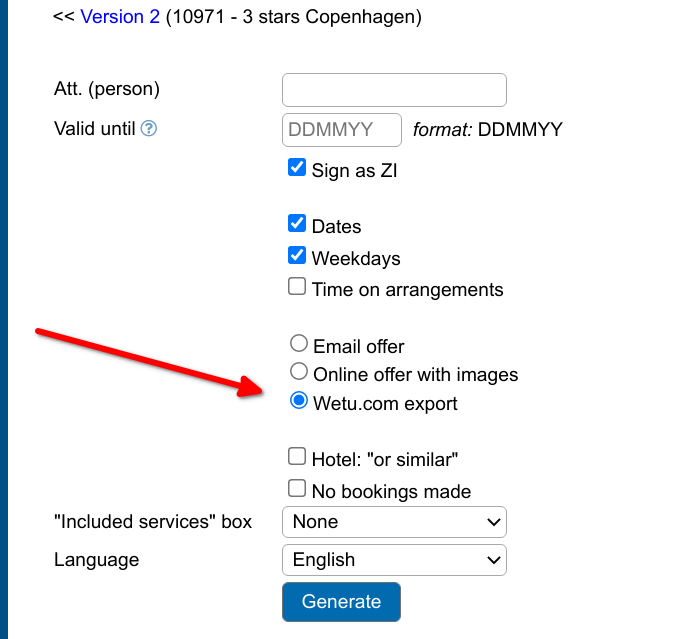
Just click on Generate and you are taken to the Wetu link:
Step 3: Finalise and send in Wetu
You’re redirected to Wetu where the full itinerary is already created for you.
From there you can:
-
Add descriptions and images
-
Adjust formatting
-
Publish or share the itinerary with your client

That’s it. No retyping, no copying, no rebuilding the trip.
Is there an extra cost from Nitro for using Wetu?
No. The Wetu integration is included in your Nitro subscription.
There is a subscription fee on the Wetu side. Any fees are paid directly to Wetu based on your plan with them.
Can I use Nitro without Wetu?
Yes. Nitro works perfectly on its own for quotes and trip planning. Wetu is optional and only needed if you want advanced itinerary design and presentation.
What data is sent from Nitro to Wetu?
Core trip details like travel dates, guests, lodges, and activities are sent automatically. You control all final edits inside Wetu.
Do I need to connect my Wetu account every time?
No. You connect it once. After that, generating itineraries is one click.